
GanttPRO
Sign in
  • Getting started
  • Views
      • About Gantt chart
      • Customizing Gantt chart view
      • Creating dependencies
      • Deleting dependencies
      • Adding lags and leads
      • Zoom
      • Bulk change
      • Overdue tasks
      • Critical path and Float
      • Collapse/Expand
      • Cascade sorting
      • Baseline view
  • Projects and portfolios
  • Tasks and fields
  • Team and collaboration
  • Resource management
  • Import, Export, Sharing
  • Security and Access
  • Integrations and API
  • GanttPRO for Mobile
  • Subscription and Billing
  • Tips
Knowledge BaseViewsGantt chart

Gantt chart

Zoom

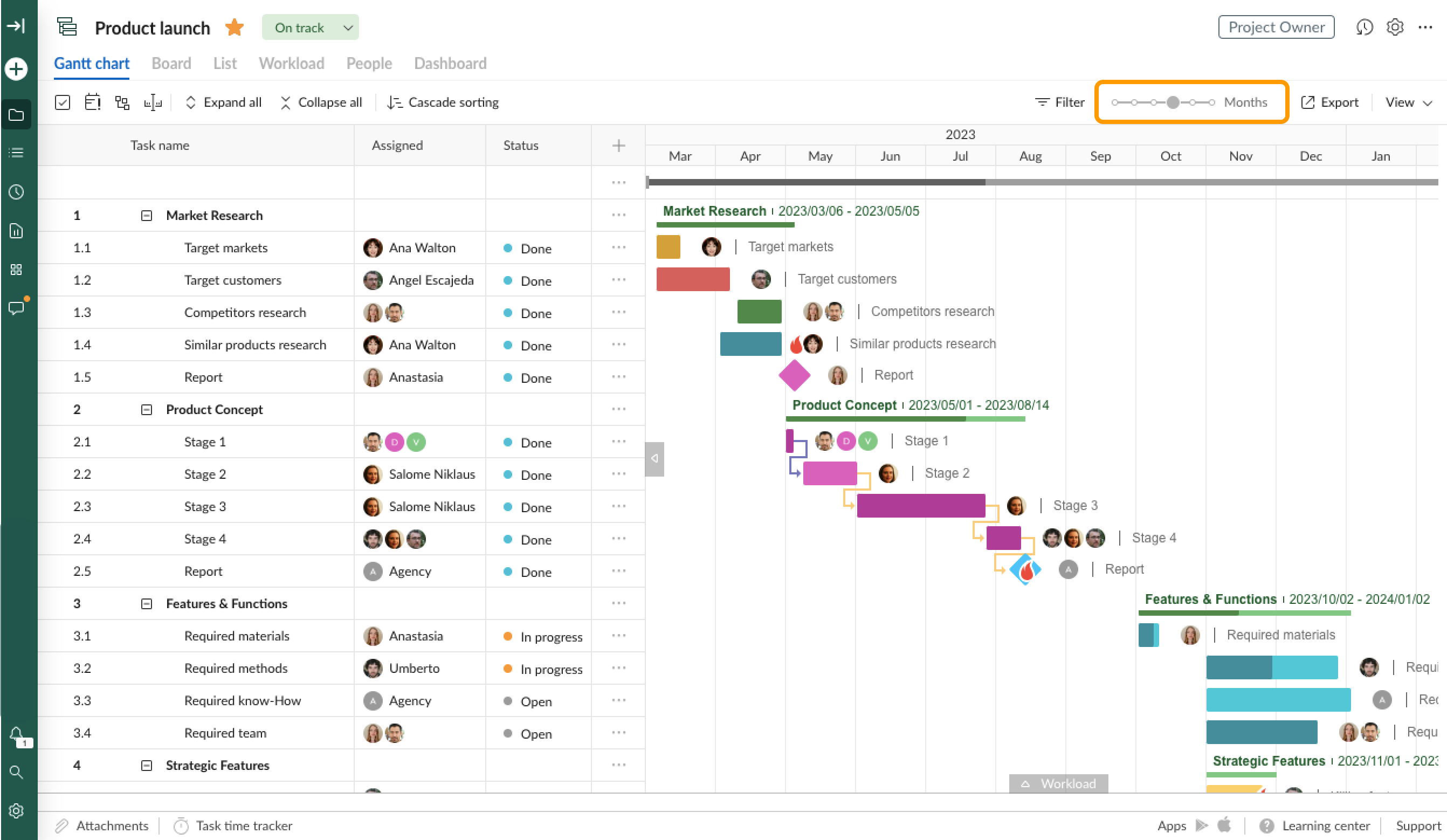
It can be more convenient to set the timeline in hours, days, weeks, months, quarters, or even years, depending on the duration and type of your project and tasks. 

To configure the timeline of the Gantt chart, just move the Zoom slider in the top right corner and choose the most appropriate option.
Gantt chart view - Zoom.png

Was this article helpful?

PreviousAdding lags and leadsNext Bulk change

Still need help? Write to us at support@ganttpro.com

Back to top
    • Why us
    • Features
    • Integrations
    • Product updates
    • Product training
    • Brand assets
    • About us
    • Awards
    • Customer stories
    • Partnership
    • Startup program
    • Affiliate program
    • Consultant Program
    • Non-profit
    • Help center
    • Video tutorials
    • Community hub
    • Terms of Use
    • Privacy Policy
    • Data Processing Addendum
    • Cookie preferences
    • Security
    • vs Microsoft Project
    • vs Excel
    • vs Smartsheet
    • vs Teamgantt
    • vs Wrike
    • Online MPP viewer
    • AI Gantt chart maker
    • Milestone tool
    • Integration with Jira
    • WBS creator
    • Critical path software
    • Gantt chart with resource allocation
    • Gantt project planner for research
    • Gantt project planner for architecture
    • Gantt project planner for construction
    • Gantt chart templates
    • Residential construction schedule template
    • Marketing templates
    • Construction templates
    • New product launch plan template
    • Maintenance schedule template
    • View all
    • Best Microsoft Project alternatives
    • Best Gantt chart JIRA plugins
    • Best Basecamp Gantt chart solutions
    • Best project management software for Mac
    • Gantt chart examples in project management
    • How to make a Gantt chart in Microsoft Project
    • Project milestones examples
    • How to open and view MPP files
    • Instagantt alternatives
    • How to convert Excel to a Gantt chart
    • Best construction scheduling software
    • Best marketing planning software
    • How to export Microsoft Project
    • Work breakdown structure examples
    • Best Work breakdown structure (WBS) software
    • Go to all blog posts
  • Product

    • Why us
    • Features
    • Integrations
    • Product updates
    • Product training
    • Brand assets
  • Company

    • About us
    • Awards
    • Customer stories
    • Partnership
    • Startup program
    • Affiliate program
    • Consultant Program
    • Non-profit
  • Support

    • Help center
    • Video tutorials
    • Community hub
    • Terms of Use
    • Privacy Policy
    • Data Processing Addendum
    • Cookie preferences
    • Security
  • Compare

    • vs Microsoft Project
    • vs Excel
    • vs Smartsheet
    • vs Teamgantt
    • vs Wrike
  • Solutions

    • Online MPP viewer
    • AI Gantt chart maker
    • Milestone tool
    • Integration with Jira
    • WBS creator
    • Critical path software
    • Gantt chart with resource allocation
    • Gantt project planner for research
  • Templates

    • Gantt chart templates
    • Residential construction schedule template
    • Marketing templates
    • Construction templates
    • New product launch plan template
    • Maintenance schedule template
    • View all
  • Blog

    • Best Microsoft Project alternatives
    • Best Gantt chart JIRA plugins
    • Best Basecamp Gantt chart solutions
    • Best project management software for Mac
    • Gantt chart examples in project management
    • How to make a Gantt chart in Microsoft Project
    • Project milestones examples
  • Facebook
  • X
  • Linkedin
  • Instagram
  • Youtube
  • App Store
  • Google Play

Cookies help us deliver our services! By using our services, you agree to our use of cookies. Read more in Privacy Policy.

support@ganttpro.com+13019797792 DPM Solutions Sp. z o.o., Poland, VAT ID PL6793271397, KRS 0001046070

© 2026 GanttPRO All rights reserved.